Your law firm website offers a creative opportunity to showcase your firm’s brand. While developing your website, though, it’s easy to overlook practical considerations and user-experience pitfalls. Over the past several months, I’ve kept track of common-sense oversights that seem to plague law firm websites.
No Mobile Version
Most likely, somewhere between 20 and 30 percent of your website traffic is browsing from a mobile device. If visitors have to pinch and squeeze to read content and scroll through a complicated navigation, they will leave your site. Internet users simply don’t have any tolerance for sites that don’t render well in mobile – and neither does Google. Do your users and search engines a favor – “mobilize” your website.
Clutter
It’s tempting to dump every single legal marketing thought you’ve ever had into your web page. But please don’t. Design your website with first-time users in mind. Keep it clean and intuitive so visitors aren’t overwhelmed by clutter. Use only one primary call to action per page and make sure it’s clear through the design what you want your visitors to do.
Ridiculously Complicated Navigation Structures
Again, think of the first-time user. Develop an organized navigation structure that doesn’t read like a Paris road map. Try to stick to two levels of navigation … three at the most. Consolidate and organize pages to guide your visitors through your website content in a logical way.
Poor-Quality Bio Photos
We live in a visual world. Low-quality photography and images on your website are a reflection of your personal brand. Schedule a photo shoot to retake your attorney bio images. You’ll be amazed at how high-quality images really spruce up your bio pages.
No Google Analytics Tracking Code
The Google Analytics tool tracks visitor data on your website for free. It’s easy to install and provides a fairly user-friendly interface. This is a must for legal marketing professionals who want to understand how people interact with their websites. Have your website developer install the tracking snippet and start digging into the data.
Broken Site Search Functionality
Visitors should be able to search by keywords within your website. Position your site search field prominently. Test various searches to ensure the results yield relevant pages.
Videos or Sound that Plays When the Page Loads
If you have video or audio files on your website that play automatically on page load, you’re more than likely scaring away visitors. Make sure you disable automatic play in your video and audio players. That way, visitors can watch your videos when they’re ready and not be startled into leaving your site.
YouTube Video Thumbnails
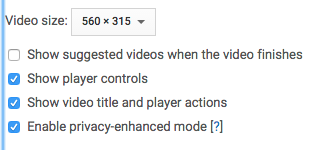
When YouTube players finish playing, they often deliver thumbnails of related content. From a reputation standpoint, this could be disastrous since you cannot control which thumbnails are delivered. (And we all know that YouTube has a vast library of inappropriate content.) When pulling YouTube embed code, deselect the “Show suggested videos …” box.
Internal Links that Open in New Windows
Sometimes you unknowingly have five new browser tabs open from all the internal links you’ve clicked on a web page. When creating links within your content, make sure that internal links – those leading to other pages on your website – open in the same window. External links – those pointing to other websites – should open in new windows.
Marketing for Your Website Developer
You may have a link to your website developer in the footer of your law firm website. Developers often include these links without asking permission. Decide whether you want to promote your web developer with a link to the developer’s site. If you choose to include a link, make sure it opens in a new window so visitors aren’t redirected away from your website. If you don’t want to provide a link to your website developer’s site, ask the developer to remove the link.
To inquire about how to improve your law firm website or develop a new website, contact Jaffe at info@jaffepr.com.